
I want Compose Key for all my keyboards
Written by Nagata Aptana, 12 June 2024
Seriously. It is one of the most underrated features that has ever existed in a desktop. For those who don’t know, Compose Key lets you put a character that doesn’t exist on your keyboard using a sequence of key presses. Old keyboards like the LK201 had a dedicated compose button for starting the sequence, but nowadays people sacrifice one button (usually Right Alt or AltGr) for that purpose.
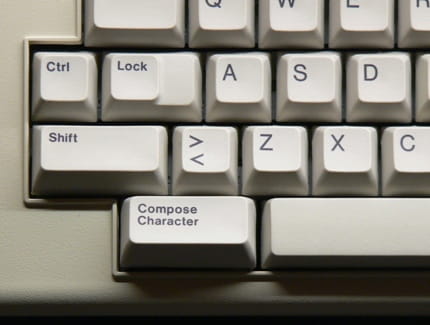
What does it look like?
For example, you can input these symbols using only a standard US keyboard:
| Output | Sequence | Comment |
|---|---|---|
| ѐ | Compose + acute + e | |
| ¢ | Compose + bar + c | This also works for non-letters |
| Ǖ | Compose + underscore + apostrophe + U | You can have more than one diacritics! |
Even better, you can customise it to print anything you want! Custom sequences are supported as long as it does not collide with any other sequence.
| Output | Sequence | Comment |
|---|---|---|
| Hello, World! | Compose + h + w | You can print multiple characters at once |
| 🤣 | Compose + l + o + l | Emojis or any Unicode characters are supported |
| 👨🏼👩🏻👧🏽👦🏻🔊🗣️🗣️🔥🔥 | Compose + b + u + r + n | This series of emojis is 69 bytes long |
| fi | Compose + f + i | Latin ligature “fi” in one symbol |
| 🔥 | Compose + f + i + r + e | INVALID! This sequence’s prefix collides with fi's sequence |
But I’ve never heard about this!
Yes, you’re probably right. This feature is only available on Gnome, KDE, ChromeOS, and some other Linux desktops. It’s not even enabled by default. Personally, I found this feature during the COVID lockdown when I used Arch Linux daily for my online high school. As an undergrad I can no longer afford to tinker around Linux and decided to stick to the tried-and-tested Windows.
I can’t speak for Mac users, but Windows’ alternative way sucks. Before Windows 10, I had to open a program called Character Map, find the symbol, then copy and paste into the text. It gets better in Windows 10 onwards by using the Windows + dot shortcut that opens a search menu. Technically, I can use the Alt Code input method, but it’s limited to older symbols and requires a numeric keypad, so I can’t use it on my laptop. All these are no match with Compose Key’s 3-key mnemonics.
Bringing Compose Key to Windows
I installed a program called WinCompose on my Windows machines which provides all the features needed for a proper Compose Key experience and wraps it with a graphical user interface (GUI). It runs as a background service and listens to my keyboard presses to decide when to compose. It might be a bit concerning to have a program that snoops on your keyboard, but since it is a free and open source program, you can verify by looking at the source code that it does not log or send your keypresses out of your computer.
Nevertheless, WinCompose has some shortcomings. The main UI feels laggy and janky. There’s a search menu where you can find Unicode symbols with their associated compose sequence, but it feels unnecessarily slow. Longer strings take a while to show up. The tray icon tooltip shows up in random places on the screen.
I had a hunch that these issues are caused by its threading model that blocks one another. I haven’t really wrapped my head around how the code works, but if they put GUI and keyboard listener on the same thread, they might wait for one another to finish, which makes it feel laggy if the wait is more than 16ms for GUI or 2ms for keyboard.
A (potentially) better Compose Key
This is such an interesting subject for me that I decided to write my own Compose Key implementation. The main goal is to implement a working Compose Key that does not succumb to the annoying issues above. I also want to make the UI look nicer using the Windows 11 UI guidelines as well as writing the program in C++ for lighter resource usage on low-end computers (read: my laptop).
I call this project “simbolmudah”, which means “easy symbol” in Indonesian. If you want to follow my journey, stay tuned! I will post more writeups about simbolmudah and its inner workings.